Playbook / Design practices / Process Mapping

Process Mapping
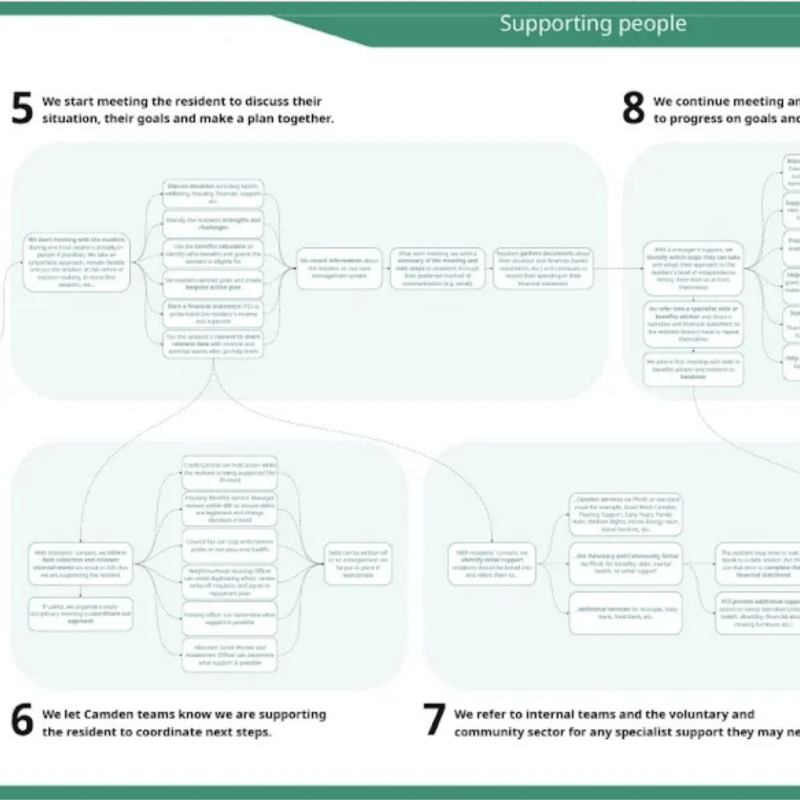
Process mapping is a way to visualise how a service works end-to-end — from the resident journey through to the behind-the-scenes activities, decisions, teams, and systems. It helps teams build shared understanding, identify risks and gaps, and test how a new service model will operate in practice.
Tips
1. Build the map collaboratively from the start
Co-creating the process map with frontline staff, managers, and partner teams surfaces hidden steps, clarifies ownership, and builds shared commitment to the future service model.
2. Use the map to drive decisions, not just document processes.
Treat the map as a working design tool where uncertainties, options, and open questions are visible and discussed until resolved.
3. Keep the first version intentionally incomplete
Starting with placeholders and “unknowns” invites contribution and signals that the map is evolving, encouraging teams to engage rather than seeing it as finished.
4. Map both the resident journey and the operational reality
Include handoffs, decision points, system interactions, and responsibilities so the map reflects how the service actually functions behind the scenes.
5. Update the map continuously during design and testing
Frequent small updates keep the artefact relevant and help teams track how the service model is evolving.
6. Design a maintainable version for delivery teams
Create a simplified, clearly owned version that teams can update themselves after implementation so the map remains useful operationally.
7. Make the map visible and accessible
Keep it in a shared digital workspace (and, where possible, visible in physical team spaces) so it becomes a living reference point rather than a hidden design output.
8. Use map walk-throughs as an engagement method
Walking stakeholders through the map step-by-step helps identify risks, validate assumptions, and strengthen buy-in across services.
The practice helps you
Build Trust
Create consistent, transparent experiences that foster user confidence
Deliver Delight
Create emotionally engaging or enjoyable experiences for
Drive Engagement
Encourage interaction and sustained user interest
Examples of practice

Supported by




 LGSDN
LGSDN 